Design decisions when building games using ECS II
Even though the previous part covered a lot of aspects on how I am using ECS (entity component system) when making games, I have new examples and stories I want to share so I decided to write this new blogpost.
For the ECS solution I decided to use leoecs-lite, with my own systems and tools over it. I am using it for game jams and for Ship Miner:
Introduction
When making games with ECS I believe one important feature to have is a scripting framework to support running specific logic in some entities. In my solution the scripts are named Controllers and they are stored in a ControllersComponent. Using a scripting framework is better for logic that can be added and removed dynamically (I suppose it also helps when adding mod support).
For example, the Repair Drone Controller looks something like this:
public class RepairDroneController : MonoBehaviour, IUpdate, IStateChanged, IInit, IDamagedEvent, IDestroyed
{
    public float healingPerSecond = 1;

    public float totalHealing;
    private float currentHealing;

    [EntityDefinition]
    public Object rayDefinition;

    private Entity rayEntity;

    public bool autodestroyOnComplete;

    // ... CODE ...

    public void OnUpdate(World world, Entity entity, float dt)
    {
        ref var states = ref entity.Get<StatesComponent>();
        ref var abilities = ref entity.Get<AbilitiesComponent>();
        ref var animations = ref entity.Get<AnimationsComponent>();

        var healing = abilities.GetAbility("Healing");
        var findHealingTarget = abilities.GetAbility("FindHealingTarget");

        // ... CODE ...

        if (currentHealing >= totalHealing)
        {
            healing.Stop(Ability.StopType.Completed);
            states.ExitState("Healing");
            return;
        }

        // ... CODE ...
    }

    // ... CODE ...

}
Since it is a MonoBehaviour, it can be configured in the Unity inspector like this:
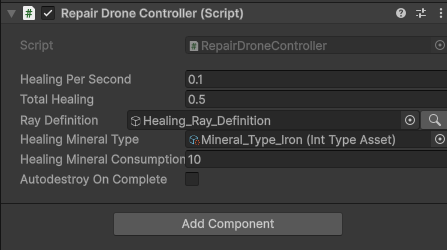
NOTE: in the core API there is no need to inherit MonoBehaviours, but the only implementation I have right now is based on that right now to take advantage of the Unity Editor and its serialization system for customization. At some point in the past I tried with lua implementation using MoonSharp but it was too early for lua at that time.
This is super specific to this unit, it checks for targets to repair inside some range, if it finds one, it locks on a target and decides to move there, once it is close it activates a ray to repair the target, and then disables the ray for some time. In the game looks like this:
The role of the Controller is to be the unit’s brain manipulating the data stored in components to make the systems react to those changes.
Controllers System
Internally, the ControllersComponent has the list of Controllers. In the entity definition I reference the object where all the Controllers are declared. For example, the Repair Drone has the following prefab definition:
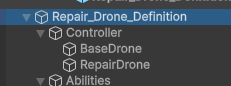 This is how part of the entity definition (or entity prefab) looks.
This one in particular uses two controllers, the BaseDroneController with some common logic for drones (could be moved to systems) and the RepairDroneController with the unit specific logic.
Then, when a new entity with ControllersComponent is created, the ControllerSystem initializes it by getting all the Controllers declared in the prefab and registering them in the component. Later, the ControllerUpdateSystem iterates over the controllers in the component and call the Update method for Controllers implementing that callback. This is a simplified view of the system, for more information check the code at github.
Prefer Stateless Controllers
In my previous post I talked about my process when I didn’t know where to put new logic if it should be in a System or in a Controller. Now, after using that workflow multiple times, another thing that I learned is that, when I decide to go with a Controller, I prefer try to keep them as stateless as possible, and it is usually simple to do it.
In the previous example, the repair drone has both configuration values like healingPerSecond or rayDefinition (that’s ok, could be better) and runtime values, like the currentHealing or the rayEntity. Runtime values in Controllers are an issue for the future, and here are some of the reasons  :
:
- Data is not easy accessible from other controllers nor systems if needed for other logic.
- For the same reason and also because data in controllers tends to not follow a common structure, it is harder to debug. When data is in Components it is easier because it normally follows a more consistent structure and it is easy to iterate over all the components.
- I can’t reuse the same Controller instance since different entities will share same runtime data. So, I need to have a Controller instance per entity in that case, while for stateless Controllers I can make all entities of the same definition reuse the same instance (this also simplifies pooling).
- It is harder to serialize in case I want save/load the state of an entity or send it over the network.
What I try to do now is, first, try to see if I can store the data I want in an existing Component that make sense. For example, if I am creating some cooldowns to execute some action, maybe I can use other Components I already have like the AbilitiesComponent. If I can’t, I just create a new Component, could be a general use Component if it makes sense, or could be a specific Component. In the case of the Repair Drone, I could create a specific Component like this one:
public class RepairDroneComponent : IEntityComponent {
    public float currentHealing;
    public Entity rayEntity;
}
And then either add that Component as part of that Entity Definition or add that Component dynamically in the Controller Init() and then use it by accessing the entity.Get<RepairDroneComponent>() in the rest of its logic.
Moving data to Components here for Controllers also simplifies when deciding to move logic to systems at some point in the future.
And what about the configuration values?
Well, having configuration values it is a bit less troublesome since normally the values are kinda constant but still have some issues:
- If I want different configuration values, I need for sure different Controller prefabs for each config, so I can’t reuse the Controller instance. However, it is normal to have different list of controllers per entity definition so in that case coupling the constant data is not so wrong. For example, the Scout Drone entity definition also uses the
BaseDroneControllerbut with another Controller for the main logic, so the structure of controllers is already different to the one in the Repair Drone definition, and the configuration too. - It makes less clear where the entity definition configuration is, sometimes is in Components, sometimes in the Controller, and that makes me lose time searching where the data is.
- It is also harder to make it visible, I have to go to each definition prefab to see the configuration values.
- I have to avoid modifying the configuration values in runtime, but it is easy to do it because they are there with the logic.
- If I decide to switch scripting solution or mix with different scripting solutions, I need to move out the configuration values.
To improve this, I can either move those values to a new Component, for example the RepairDroneConfigurationComponent or could even be the same Component I use for the runtime data if I want to.
Another option could be to move it to use a separated configuration concept, like we did in Iron Marines 2, and that’s the next story.
How we did configurations in Iron Marines Invasion
When we did our ECS during the development of Iron Marines Invasion (aka IM2), we knew that we wanted to have configurations like we had in IM1, using json files where game designers could easily modify values and/or customize units.
The json files for configurations had a structure similar to this one:
{
    "army" : {
        "units" : {
            "unit_ranger" : {
                "health" : 100,
                "abilities" : {
                    "base_attack" : {
                        "damage" : 100
                    }
                }
            }
        }
    }
}
The solution worked like this, there was a ConfigurationComponent declaring the configuration key to use. For example, the ranger unit used the army.units.unit_ranger as the configuration key.
The ConfigurationComponent stored the key and a cached dictionary for everything that was inside that key, for example, in the case of the previous key, the dictionary will only contain the values for unit_ranger entry.
The ConfigurationSystem pre processes the json files and it created the cached dictionary of values and stored it in the ConfigurationComponent. After that, there were multiple subsystems that configured each component of the entity, for example:
foreach (e in <ConfigurationComponent, HealthComponent>) {
    if (e.configuration.contains("health")) {
        e.health.total = e.configuration.asFloat("health")
    }
}

// ...

foreach (e in <ConfigurationComponent, AbilitiesComponent>) {
    foreach (ability in e.abilities) {
        if (e.configuration.contains($"abilities.{ability.name}")) {
            ability.damage  = e.configuration.asFloat($"abilities.{ability.name}.damage")
        }
    }
}
NOTE: as always, I am oversimplifying the code but the configuration supported accessing the keys with a flattened version like the second subsystem example.
This allowed us to expose to game designers only the things they needed to configure and balance the game. One great lesson was that by systemizing we needed to create a common structure to configure similar things and that improved a lot the trial and error compared to IM1 where we decided how to configure each unit each time and it was more difficult to use same criteria for everything and game designers were some times trying stuff that didn’t exist. For example, for one hero I might decide the health would be named life in the configuration and then another developer might decide it should be named hitpoints for another hero he is developing, and since we loaded the configuration in each unit logic, that inconsistency was more common.
For IM2, we still supported special cases, if there was a configuration that made no sense to be a general one, the Controller of the unit could access the ConfigurationComponent and try to get the specific value. If at some point we decided that config should be more general, we could create a new component and then add a new configuration subsystem to read from the config to that component, and remove the specific code from the unit controller. That process is related to the to the “I don’t know where to put logic if controllers or systems”.
In case of modifying the configuration, there was a way of asking the ConfigurationSystem to reload the values.
I really like this system, when I started my own engine over ecs, I implemented the core parts but since I normally configure the controllers or components in the entity definition, I feel I don’t need it for now.
One interesting point of this configuration was supporting overrides of entries in the main dictionary, so if we wanted to have special values for some unit either by development scenes or because there was an upgrade active, what we did was just override the main dictionary values and then the unit was already reading from that, which leads me to the UpgradesSystem story.
How we did upgrades in Iron Marines 2
I already spoiled this a bit but the main idea was to override values in the main configurations dictionary. What we did for that was to have jsons with specific values to override, for example:
{
    "upgrade_super_rangers" : {
        "army.units.unit_ranger" : {
            "health" : [200, 300, 400, 500]
        }
    }
}
We treated overrides as arrays and we considered the level of the upgrade to read from there when overriding. In that example, the first level for that upgrade will override the health with the number 200 so when the configuration system configures the health, it uses the new value.
I remember 
 also adding some extra support to declare stuff as percentage or factors, so instead of doing the final number we could do something like this:
{
    "upgrade_super_rangers" : {
        "army.units.unit_ranger" : {
            "healthPercentage" : [120, 140, 160, 200]
        }
    }
}
In that example instead of overriding the health, the final health was the original value * the specified percentage, so for the last level of the upgrade the health would be 200, considering the value specified in the configuration.
Reacting to events in Controllers
In order to react to events in Controllers what I do is to have a way to implement different callbacks and then I have specific systems to call them if the event was triggered. As an example, there is a IHealthStateChanged interface to implement to be called when the unit either died or came back to life. After the HealthSystem is processed there is another system, the OnHealthStateChangedControllerSystem, that checks for the health state change and if that happened, it iterates over all the controllers implementing the callback and invoke them. It is optional but it helps me to react to events in the scripting system.
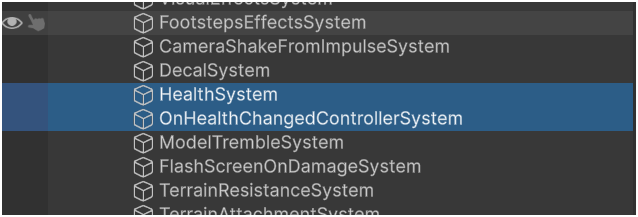 In the systems declaration, I have the callback system after the health system like this.
The reaction callback system code is something like this:
public class OnHealthStateChangedControllerSystem: System {
    public void Update() {
        foreach (e in filter<HealthComponent, ControllersComponent>()) {
            if (e.health.previousState != e.health.currentState) {
                foreach (controller in e.controllers) {
                    if (controller implements IHealthStateEvent) {
                        controller.OnHealthStateChanged(e)
                    }
                }
            }
        }
    }
}
Event Components
One thing I use in some cases now is to add a temporary Event component to react to some important data change that happened in a system. It is kinda the opposite to the Command component I explained in the previous post which was also temporary component and it is used to trigger systems to do some data change.
In the case of the HealthSystem what I normally do is to store two values in the HealthComponent, the previous and the current value, so I can check that in the other systems to decide to run or not. But in some cases, I prefer to not have that exposed, and to add a new temporary event Component, maybe with more information, and then remove it in the next iteration. This helps in not having to have all that extra information in the base component and even to not have to track the previous state.
For example, if I wanted to store how the entity died and where it was when that happened, I could create a HealthStateEventComponent like this:
public struct HealthStateEventComponent : IEventComponent {
    public Vector3 position;
    public Vector3 damagePosition;
    public bool died;
    public string extraInformation;
}
Then, the HealthSystem would change part of its code to something like this:
public class HealthSystem: System{
    public void Update() {

        foreach (e in filter<HealthStateEventComponent>()) {
            world.Remove(e, HealthStateEventComponent);
        }

        foreach (e in filter<HealthComponent>()) {
            var previousState = e.health.current;

            // process damage logic here and store killDamage to use later

            if (previousState != e.health.current) {
                world.add(e, new HealthStateEventComponent() {
                    died = e.health.state == death
                    damagePosition = killDamage.position
                })
            }
        }

        foreach (e in filter<HealthStateEventComponent, PositionComponent>()) {
            e.healthStateEvent.position = e.position;
        }
    }
}
And the OnHealthStateChangedControllerSystem would change to iterate only on the entities with that Component and avoid the health changed state check internally. For example, that system could be changed to this:
public class OnHealthStateChangedControllerSystem: System{
    public void Update() {
        foreach (e in filter<HealthStateEventComponent, ControllersComponent>()) {
            foreach (controller in e.controllers) {
                if (controller implements IHealthStateEvent) {
                    controller.OnHealthStateChanged(e)
                }
            }
        }
    }
}
Suppose now I want to react to that new event in the RepairDrone to do some last blast when it dies, I could do something like this:
public class RepairDroneController : ..., IHealthStateEvent
{
    // ... OTHER CODE ...

    public void OnHealthStateChanged(Entity e) {
        var eventData = e.Get<HealthStateEventComponent>()

        if (eventData.died) {
            var blastEntity = world.CreateEntity(blastDefinition);
            blastEntity.Get<Position>().value = eventData.damagePosition;
        }
    }
}
This helped in keeping internal to the systems originating the event how the event happened, and keep clear to the ones reacting that they are reacting to the event not to the internal data change in some way. Also allows me to react in different systems without having to know the react logic (in the case of the health, check the previous and current state).
Custom Editor Window for Entities
LeoECS lite already has a way to see components data in the inspector but it does it with gameobjects and over time it became a bit limited and annoying for me so I decided to create my own editor window reusing part of the code.
This is the window I normally use when checking for data:
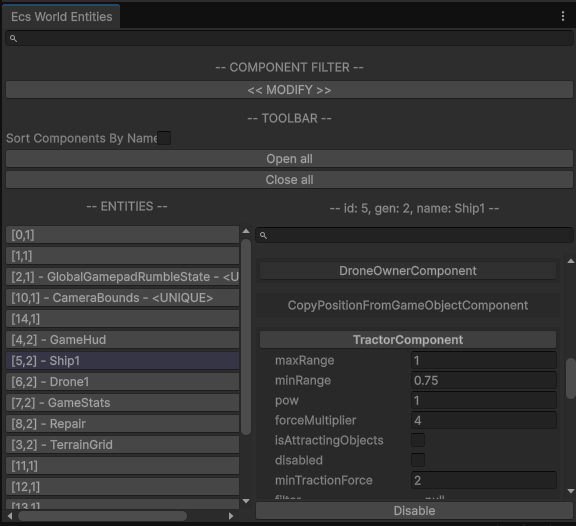
It allows me to do query filter like systems do, for example, I can check for entities containing some components but not others, and then I can also filter by component names, sort by name, etc.
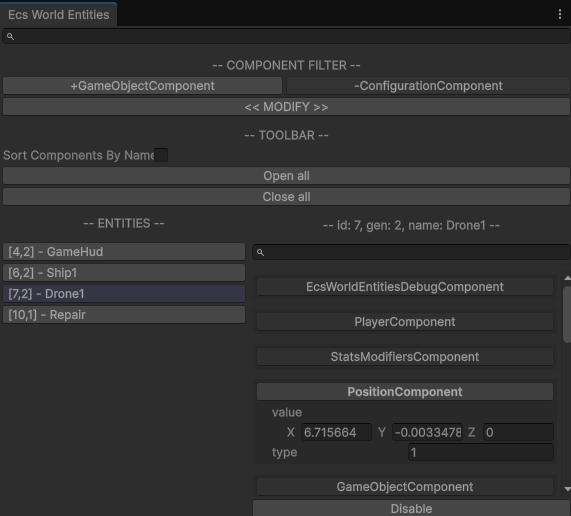 In this case I am filtering entities with GameObjectComponent and without ConfigurationComponent
For entities with NameComponent, I also show the name together with the entity id to easily identify them (for example the player ship).
By default, it supports all type of components with plain basic fields, but when components have more data like lists for example, it doesn’t show that. However it supports implementing custom inspectors in a generic way to show those cases as you want. For example, this is the custom inspector for MineralsCollectorComponent:
sealed class MineralsCollectorInspector : EcsComponentInspectorTyped<MineralCollectorComponent>
{
    public override bool OnGuiTyped(string label, ref MineralCollectorComponent collector,
        EcsEntityDebugView entityView)
    {
        EditorGUI.indentLevel++;

        for (var i = 0; i < collector.minerals.Length; i++)
        {
            var mineral = collector.minerals[i];
            var mineralName = MineralTypes.ValueToName(i);

            if (mineral > 0 && !string.IsNullOrEmpty(mineralName))
            {
                EditorGUI.BeginChangeCheck();
                mineral = EditorGUILayout.FloatField(mineralName, mineral);
                if (EditorGUI.EndChangeCheck())
                {
                    collector.minerals[i] = mineral;
                }
            }
        }

        EditorGUI.indentLevel--;

        return true;
    }
}
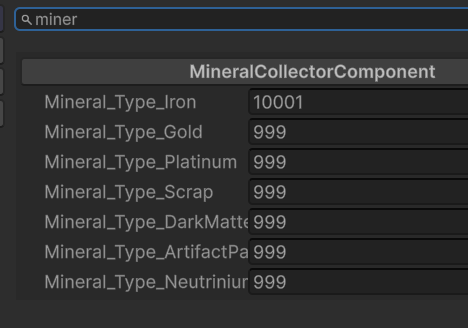
That is pretty handy since it is autodetected by the ecs custom editor. In there I could also modify data and/or show it in a more interesting way.
Conclusion
Now that I am at the end of the article, I remembered a couple of extra cases to talk about but will leave that for a third part of the series, I hope to write that one soon not like this one that was two and a half years later  . A couple of topics to leave in mind for me are the
 GameObjectComponent used to connect the entity with a GameObject and its EntityReference corresponding MonoBehaviour, and which data I should try to avoid in Components to make them easier to serialize.
As always I hope it was useful and please ask me here (added disqus platform recently) or in social networks or join ship miner discord or whatever you want in case you want to interact for more information.
Thanks for reading!!
Remember to add Ship Miner to your Steam Wishlist!! and spread the word if you can.
See you soon!